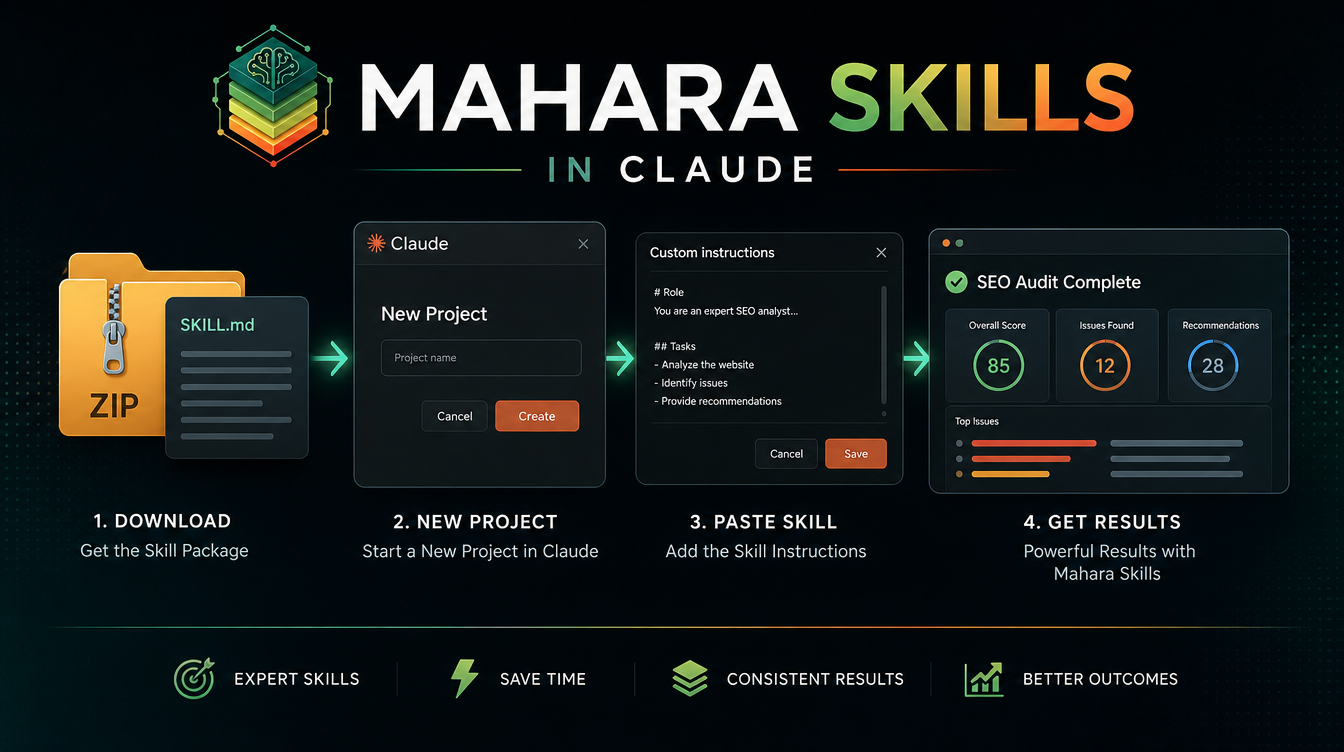
You can use any Mahara AI skill inside Claude by pasting the skill's instructions into a Claude Project's custom instructions. Claude then behaves like a specialist for that task, following a proven workflow instead of guessing. This guide covers the full setup, what you need, and a worked example — no code required.
Claude is one of the best models for long, structured work — exactly what skills are built for. The only catch is that Claude does not load ZIP files directly, so you point it at the skill's instructions manually. It takes about three minutes the first time.
What you need
- A free Mahara AI account with a claimed skill (see how to download one).
- A Claude account — the free tier works; Claude Pro helps for heavier or team use.
Step 1 — Download the skill ZIP
Pick a skill on the marketplace, claim it, and download the ZIP from your library. Free skills work just as well as paid ones for this.
Step 2 — Open the skill's instructions
Unzip the file and open the main instructions document (usually a Markdown file). This document is the "brain" of the skill — the proven workflow plus the context that keeps Claude accurate.
Step 3 — Create a Claude Project
In Claude, open Projects and click Create project. Name it after the skill so you can find it later. Projects are where Claude stores reusable instructions and knowledge for a specific purpose.
Step 4 — Paste the instructions and add knowledge
Open the project's Custom instructions and paste the skill's instructions. Then add any reference files from the ZIP as project knowledge — examples, templates, or rules the skill references. This is what turns a generic Claude into a specialist.
Step 5 — Run the skill
Start a new chat inside the project and describe your task. Claude now follows the skill's workflow. For example, an SEO and AEO audit:

Why use a skill instead of a prompt in Claude?
A one-off prompt vanishes after the chat. A skill is reusable, refined, and consistent — and the same file also runs inside Manus or ChatGPT. You compose the workflow once and own it forever. Read more in what an AI skill is.
Which Claude plan do you need?
The free Claude tier is enough to test and run most skills. Move to Claude Pro if you run skills daily, work with long documents, or need higher usage limits.
Tips for best results
- Reference the skill by name in your first message so Claude engages it explicitly.
- Keep one project per skill — mixing skills in one project blurs the instructions.
- Add real examples as knowledge files; they dramatically improve output quality.
Want the same skill in other tools? The same instructions also work in Manus and ChatGPT. Start by browsing skills and claim your first one free.