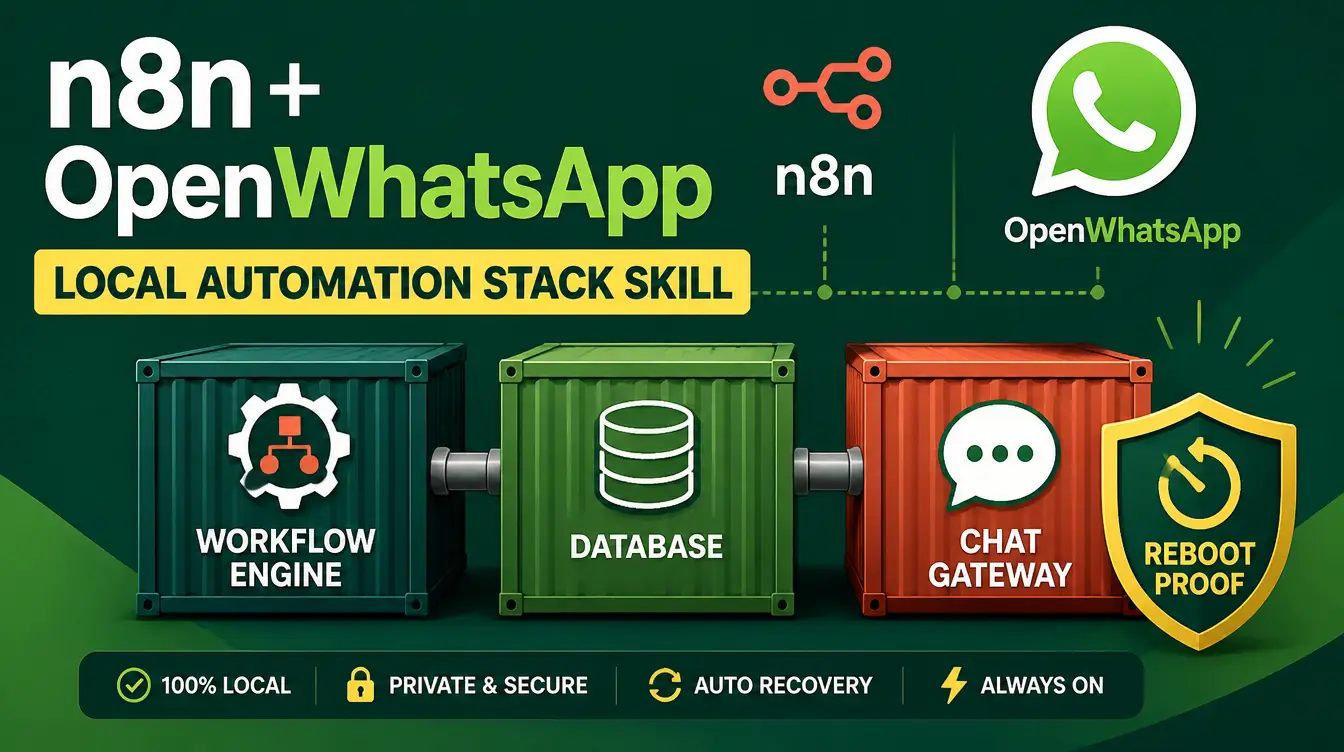
Every WhatsApp automation tutorial on the internet has the same dirty secret: it works until you restart your computer. The OpenWhatsApp + n8n Local Installation skill was written to kill that problem for good — a free, beginner-friendly AI skill that walks you through a complete local Docker stack: n8n for workflows, Postgres for storage and AI agent memory, and OpenWA as your WhatsApp gateway, all built to survive reboots.
You do not need prior DevOps knowledge. The skill assumes zero background and guides a conversation-paced setup on Windows or Mac. If you have never installed an AI skill before, our download guide covers that part in two minutes.
What exactly does this automation stack include?
Three open-source components, orchestrated by one Docker Compose setup. n8n is the workflow engine — the visual canvas where your automations live. Postgres is the database that stores both your n8n workflows and, critically, your AI agent's chat memory, so conversations have continuity. OpenWA (OpenWhatsApp) is the gateway that connects the stack to a real WhatsApp session, with session persistence so you do not re-scan a QR code every morning. Together they form a free, self-hosted alternative to paid automation platforms.
How does the installation flow work?
Install Docker Desktop and configure it to start on login — the foundation of reboot survival.
Bring up the Compose stack: n8n, Postgres, and OpenWA containers with the provided configuration.
Verify Postgres readiness before n8n starts writing to it, following the skill's reliability checklist.
Link your WhatsApp by scanning the OpenWA QR code once — session persistence keeps it linked across restarts.
Install the community node @rmyndharis/n8n-nodes-openwa inside n8n to send and receive WhatsApp messages from any workflow.
Run the reliability checklist: crash recovery, reboot behavior, backups, HTTPS, and update guidance.
Why does Postgres matter so much in this stack?
Because memory is the difference between a chatbot and an assistant. Without a database, an AI agent on WhatsApp forgets every conversation the moment it ends. With Postgres wired in, the agent's chat memory persists — it remembers the customer who asked about prices last week and picks up where things left off. Postgres also stores your n8n workflows themselves, so a container rebuild never wipes your work. The skill treats this as a first-class concern, not an afterthought, which is exactly what most quick-start guides skip.
What does "reboot-proof" actually cover?
| Failure mode | How the stack handles it |
|---|---|
| Computer restart | Docker auto-start plus container restart policies bring everything back |
| WhatsApp session drop | OpenWA session persistence restores the link without re-scanning |
| Postgres not ready | Readiness checks stop n8n from starting against a dead database |
| Data loss | Backup guidance for workflows and the database |
| Updates breaking things | A documented update path instead of blind upgrades |
The unpaid invoice of self-hosting is reliability work. This skill pays it upfront: every failure mode that normally finds you at 2 AM is in the checklist before it happens.
What can you build once it is running?
A WhatsApp AI agent that answers customer questions around the clock, with memory. An order-notification pipeline. A lead-capture flow that logs enquiries and follows up automatically — the same class of automations we describe in how AI skills automate your daily work, now running on infrastructure you own. n8n connects to hundreds of services, so WhatsApp becomes the front door to whatever backend you already use. And because the whole stack is local, there is no per-message fee and no vendor watching your data.
Do I need to be a developer?
No. The skill is explicitly zero-prior-knowledge: it explains each component as it installs it, tells you exactly which command to run and what a healthy output looks like, and keeps the reasoning conversational. If you can install Docker Desktop and follow a checklist, you can run this stack. And if you enjoy this style of working free software, the Open-Source Tool Finder skill finds and installs other vetted free tools the same way.
Where does Manus fit in?
The skill is Manus-compatible, so you can run the guided installation inside Manus as well as in Claude — our guide to using AI skills with Manus shows the mechanics. Either way, the skill does the thinking; you do the clicking.
FAQs
What is the OpenWhatsApp + n8n installation skill?
A free AI skill that guides a complete local Docker setup of n8n, Postgres, and OpenWA — with AI agent chat memory, session persistence, and a reliability checklist — on Windows or Mac.
Do I need coding or DevOps experience?
No. The skill assumes zero prior knowledge and walks you through every step, including Docker Desktop prerequisites and what healthy output looks like at each stage.
Why is Postgres included in the stack?
Postgres stores your n8n workflows and the AI agent's chat memory, so conversations and automations persist across restarts instead of resetting.
What happens to my WhatsApp session after a reboot?
OpenWA's session persistence restores the link automatically — you scan the QR code once, not every morning.
Is the OpenWhatsApp + n8n skill free?
Yes, the skill and every component in the stack are free and open source.
A WhatsApp AI agent with memory, running on your own machine, for zero monthly fees. Browse the Mahara AI skills library and build the stack this weekend.