
Most websites get broken into through doors their owners never checked: a missing security header, a dependency with a known vulnerability, an API key that leaked into git history two years ago. A website security audit with AI finds those doors before someone else does — and the Security Audit & Hardening skill on Mahara AI walks through every one of them, fixes what it safely can, and hands you a plan for the rest. This guide shows you how to run your first audit end to end, what gets scanned, and what lands on your desk when it finishes.
If the skill model is new to you, what is an AI skill explains the concept in two minutes. The short version: a downloadable bundle that teaches your assistant a complete methodology, the same way our SEO audit walkthrough packages ranking checks into one conversation. You bring the app; the skill brings the discipline.
What is the Security Audit & Hardening skill?
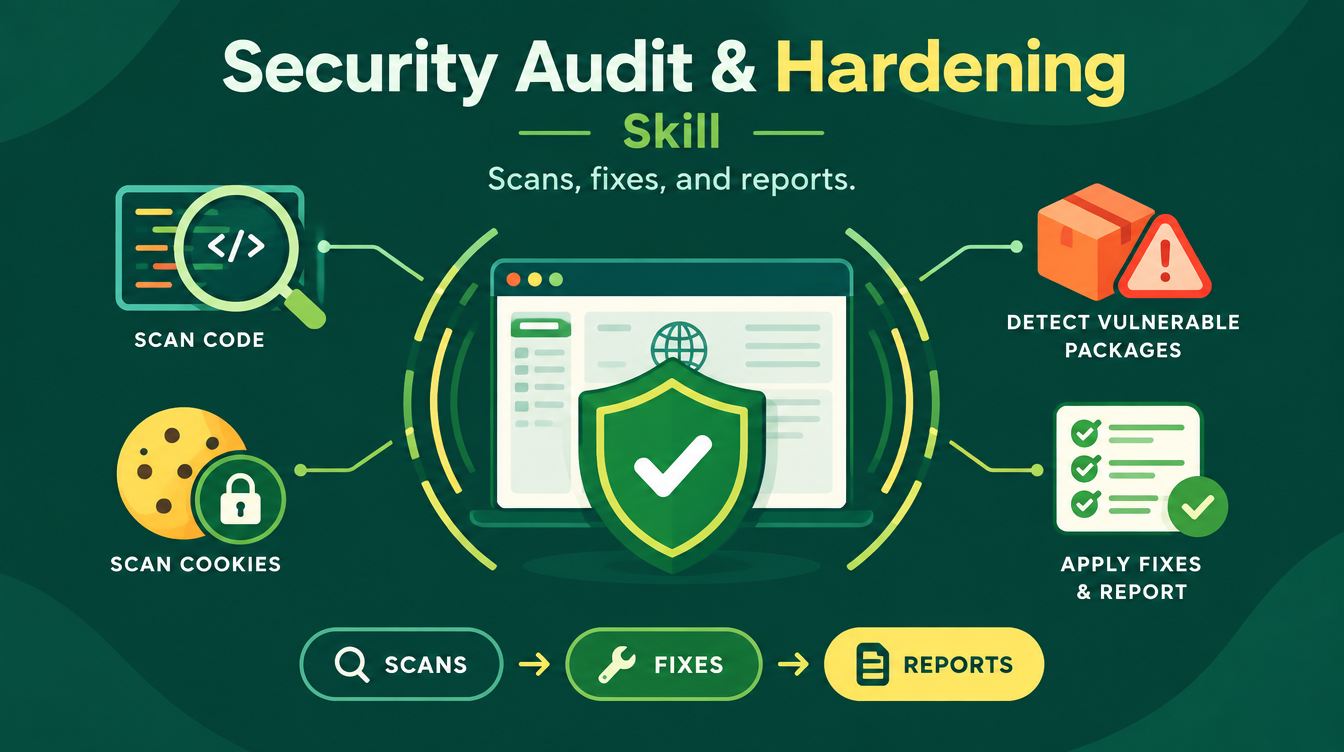
It is a defensive security skill for software you own or are authorized to test — a website, a web app, a repository. It runs eight phases locally through your coding agent, uses TestSprite (via MCP) for live functional and access-control testing when available, fixes what it safely can, and ends with two deliverables: an AI Fix Plan precise enough for another agent to execute step by step, and a Human Brief you can read in two minutes. The skill is free on Mahara AI and works inside Manus as well as local coding agents.
What does the audit actually scan?
The scan phase covers more ground than most paid checklists. Layer by layer, here is what runs:
| Scan layer | What it catches |
|---|---|
| Security headers and cookies | Missing CSP and HSTS, weak cookie flags |
| Leaked secrets (code and git history) | API keys and tokens, via Gitleaks |
| Vulnerable packages | Known-bad dependencies, via npm audit, OSV-Scanner, Trivy |
| Code flaws | Injection-prone and unsafe code, via Semgrep plus manual review |
| Attack surface | Passive OWASP ZAP scan of your live app |
| Functional and access control | Authz gaps caught by TestSprite tests over MCP |
| Container and IaC checks | Misconfigured images and infrastructure files |
| SBOM | A full bill of materials for everything your app ships with |
How does the fix phase stay safe?
By fixing in strict order: leaked secrets first — you rotate the keys yourself, then critical code issues, then headers — with a build and test run after every batch. Nothing gets patched in bulk and hoped for. The skill's ground rules are what make it trustworthy on a real project:
Defensive only, always. The skill never writes exploit code, never prints your secrets in full, prefers staging over production for active scans, and rolls out CSP in Report-Only first. Speed is never an excuse to gamble with a live app.
What do you receive at the end?
Three files and a maintenance setup. SECURITY_FIX_PLAN.md is the AI-executable fix plan, written in English and precise enough for another coding agent to run without you translating anything. findings.json carries the structured evidence, with stable IDs so every issue can be tracked to fixed. SECURITY_BRIEF.md is the human-readable version, written in your language, sized for a two-minute read. Phase eight then sets up the recurring side: a GitHub Actions CI workflow, a Dependabot config, and scheduled re-runs — because an audit is a habit, not an event. External reports you already have (Rafter, securityheaders.com, Snyk) can be pasted in at intake, and the skill tracks each item through to fixed.
How do you run your first audit?
- Intake: give the skill your repository and/or live URL, confirm ownership, pick a depth level, and paste any external audit reports you already have.
- Recon: it detects your stack, package managers, hosting config, and which scanners are installed, then writes a short threat model.
- Scans: the layers above run according to your chosen depth.
- Triage: duplicates merged, severity rated for your app's context, confidence marked, stable IDs assigned.
- Fix: secrets rotated first, then critical code, then headers — with builds and tests after each batch.
- Verify: every specific check re-runs, with before/after evidence recorded.
- Report: the fix plan, findings.json, and the human brief land in your project.
- Maintain: the CI workflow and Dependabot config keep the audit running on schedule.
One practical note from the recon phase: if a scanner is missing on your machine, the Open-Source Tool Finder skill exists for exactly that — locating and installing free, open-source tools so your audit runs at full depth.
Which depth level should you choose?
Essentials for a first pass on a small site; Standard for a production app with real users; Strict when you need the deepest review your stack allows. Higher depth adds more of the scan layers above, so the same workflow scales from a weekend project to a client engagement. You can also skip specific checks at intake — if passive ZAP or container scans do not apply to your setup, say so and the plan adjusts.
Do you need to be a security engineer?
No — you need ownership. The skill asks you to confirm you own or are authorized to test the target, then drives the process itself through your coding agent. You will make exactly one decision that matters, rotating leaked keys, and the human brief explains why. Developers running it inside Manus can follow our guide to using AI skills with Manus to load it.
What does it cost?
The Security Audit & Hardening skill is free on Mahara AI. Paid skills on the platform start at 499 EGP (about $10), there is a 499 EGP per month claim-and-keep subscription, and every purchase carries a 7-day refund. If you are starting from zero, where to find free AI skills walks you through the download path.
FAQs
What is a website security audit with AI?
It is a defensive review of your site or app run by the Security Audit & Hardening skill inside your coding agent. It scans headers, cookies, leaked secrets, vulnerable dependencies, code flaws, and containers, then fixes issues in safe order and writes a fix plan plus a human-readable brief.
Is the Security Audit & Hardening skill free?
Yes, it is free on Mahara AI. Paid skills on the platform start at 499 EGP (about $10), there is a 499 EGP per month claim-and-keep subscription, and every purchase carries a 7-day refund.
Does the skill attack my site to test it?
No. It is defensive only: no exploit code is written, active scans prefer staging over production, secrets are never printed in full, and CSP is rolled out in Report-Only first.
What are the three depth levels?
Essentials, Standard, and Strict. Higher depth adds more scan layers — Semgrep code review, passive OWASP ZAP, TestSprite functional and access-control tests, container and IaC checks, and SBOM.
What do I get when the audit finishes?
Three files — SECURITY_FIX_PLAN.md (AI-executable, in English), findings.json (structured evidence with stable IDs), and SECURITY_BRIEF.md (a two-minute human brief in your language) — plus a CI workflow and Dependabot config for recurring re-runs.
Your website has doors you have never checked. Browse the Mahara AI skills library, download the Security Audit & Hardening skill, and let it close them this week.