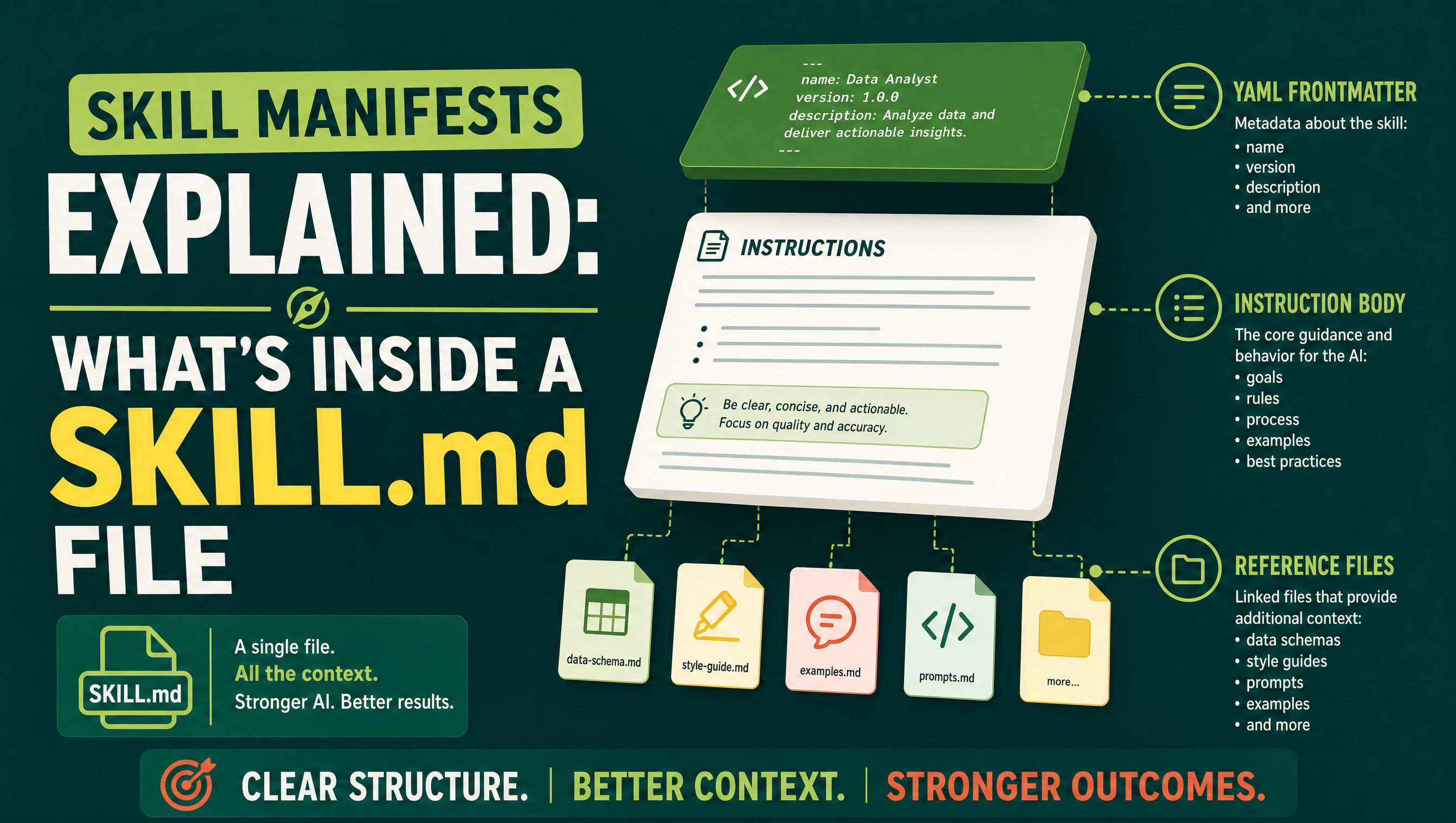
What is a SKILL.md file? A SKILL.md file is the manifest at the heart of every AI skill: a small markdown document that tells an AI agent like Claude, Manus, or ChatGPT what the skill is called, when to use it, and exactly how to run it. When you download a skill ZIP from Mahara AI and unzip it, the SKILL.md file is the first thing the agent reads — everything else in the bundle exists to support it. In this guide we break the format open, piece by piece, so you can read, trust, and even write your own skill manifests.
Skills became the standard way to package reusable AI workflows because they solve one stubborn problem: giant system prompts. Instead of pasting 3,000 words of instructions into every chat, you install a skill once, and the agent loads it only at the moment it is needed. The SKILL.md file is what makes that possible. If you are new to the concept, start with our pillar guide what an AI skill actually is.
What does a full skill package look like?
A skill is a folder, not a single file. At the top sits the SKILL.md manifest. Beside or below it, a skill may carry a references folder stuffed with extra markdown playbooks, and optionally an assets or scripts folder with supporting files the instructions point to. When you zip that folder, you get the downloadable bundle that marketplaces like Mahara AI distribute. The manifest is required; everything else is optional weight the skill carries only if it needs it.
What is inside a SKILL.md file?
A SKILL.md file has two layers: a short YAML header called frontmatter at the very top, followed by the instructions written in normal markdown. The frontmatter is metadata — machine-readable facts about the skill. The markdown body is the operational manual. The anatomy table below covers each part using the real structure of Mahara skills.
| Part | What it does | Example |
|---|---|---|
| Frontmatter name | The skill's unique identifier — the folder and manifest share it, and the agent uses it when listing or invoking the skill | name: contract-review (written as a YAML key and value at the top of the file) |
| Frontmatter description | One or two sentences that tell the agent when to load the skill — the trigger conditions | A description saying the skill applies when the user asks to review a contract or spot risky clauses |
| Instructions (markdown body) | The step-by-step operating manual telling the agent how to run the skill's pipeline, in what order, and with what output format | Numbered steps: read the document, classify each clause, flag risks, then produce a summary table |
| references folder | Optional extra .md files — deeper playbooks the agent opens only when a step requires them | A file covering negotiation tactics for each risky clause type |
| assets or scripts folder | Optional supporting files: templates, checklists, or scripts the instructions tell the agent to use | A clause-checklist template the agent fills in for every review |
A useful way to remember it: the description tells the agent when to load the skill; the instructions tell it how to run the skill.
Why the description field is the most important line
Agents like Claude hold many skills at once, but they do not read them all in every conversation — that would waste the context window. Instead, the agent keeps each skill's name and description in memory, like a table of contents. When your request matches the description, the agent pulls the full SKILL.md file into context and follows it. That is why well-written Mahara skills put as much care into the one-line description as into the instructions: a vague description means the skill never fires; a precise one means it fires exactly when you need it.
Why do manifests beat giant system prompts?
A giant system prompt is always on. It burns context in every chat, slows the agent down, and mixes instructions for tasks you are not doing today. A manifest-based skill is loaded on demand, keeps itself organized in named files, and can carry reference playbooks without cluttering the main instructions. Three concrete wins stand out:
- Context economy: the agent loads deep instructions only when the description matches your request.
- Modularity: each skill owns one workflow, so you can combine a contract skill and a research skill without editing a mega-prompt.
- Portability: a folder with a SKILL.md file moves cleanly between Claude, Manus, and ChatGPT setups — the same reason ZIP bundles work as marketplace products.
How do agents auto-load skills?
The loop is simple. At the start of a conversation the agent scans installed skills and keeps their frontmatter in mind. As you talk, it matches your request against the descriptions. On a match, it opens the skill folder, reads the SKILL.md instructions, pulls in any reference files the steps call for, and executes. You never paste anything manually. If you use Claude, our walkthrough on using Mahara skills inside Claude shows the install steps screen by screen, and many skills are available via our guide to free Claude skills you can download today.
Can I write my own SKILL.md file?
Yes — and that is the point of the format. Create a folder named after your skill, write a SKILL.md file whose frontmatter holds a name and a precise description, then write the instructions as clear numbered markdown steps. If part of the workflow is deep or rarely needed, split it into a references file so the main manifest stays lean. Test it by asking an agent a question that matches your description; if the skill fires, your manifest works. For a first taste, try a free skill like OpenSource Tool Finder and open its SKILL.md file to see a production manifest in full.
Key takeaways
- A SKILL.md file is the manifest: YAML frontmatter (name + description) followed by markdown instructions.
- The description triggers loading; the instructions drive execution.
- Optional references and assets folders add depth without bloating context.
- The same format works across Claude, Manus, and ChatGPT-compatible setups.
Ready to put real manifests to work? Browse the Mahara AI skills library, unzip a bundle, and read its SKILL.md file yourself — the fastest way to learn the format is to see it in action.