Chapters are the cheapest optimization on YouTube. No new footage, no new thumbnail, no editor — just a handful of correctly formatted lines in your description, and your video gains a navigation bar, a better chance at key moments in search results, and viewers who land on the exact section they searched for instead of bouncing off the intro. Yet most uploads skip chapters because formatting timestamps by hand is tedious and the rules are picky. Here is how to add chapters to YouTube videos correctly, by hand and with a skill that generates them for you.
What are YouTube chapters and where do they live?
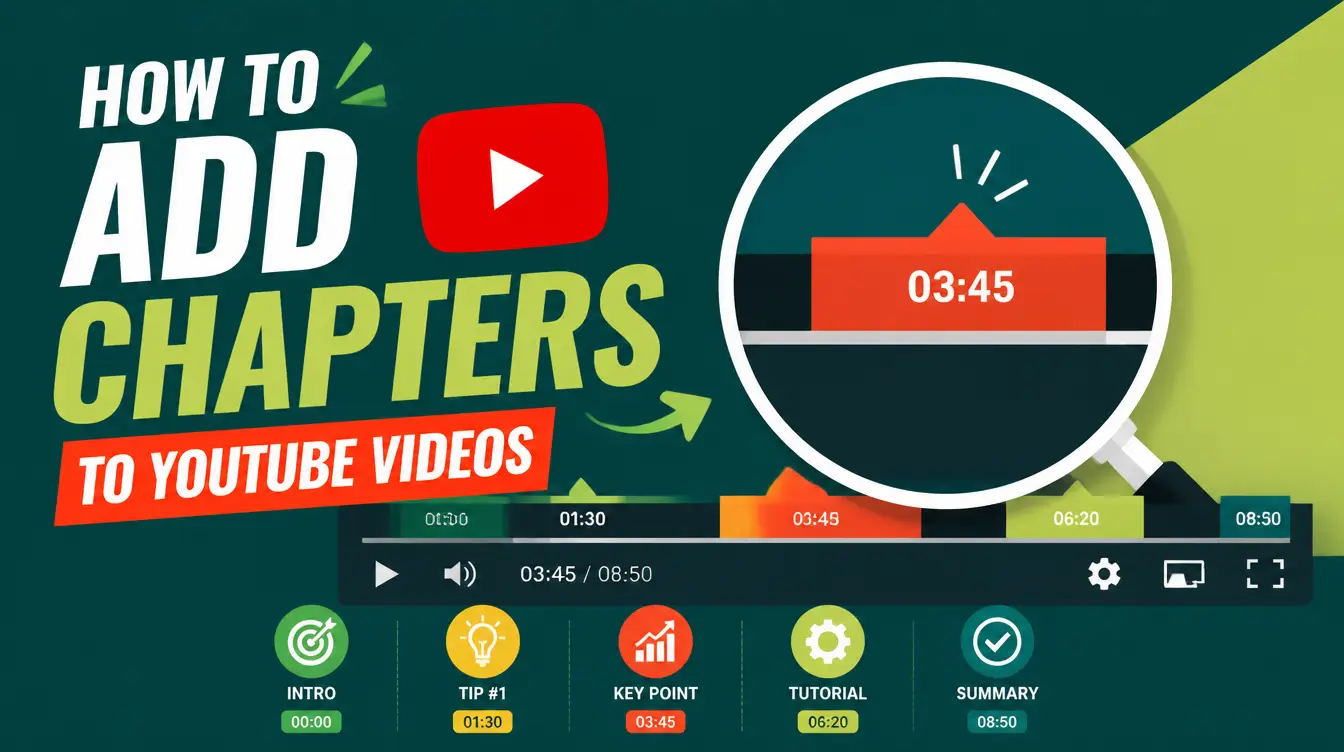
Chapters are a list of timestamps in your video description. YouTube reads that list and splits the progress bar into named segments, so viewers can jump between sections — and so search results can link directly to the moment that answers their question. There is no separate chapters field; the description is the mechanism.
What are YouTube's exact rules for chapters?
Three rules cover almost every failure case:
- The first timestamp must be 00:00 — the chapter list has to start at the beginning of the video.
- You need at least three timestamps — a single break does not create chapters.
- Each chapter must be at least 10 seconds long — anything shorter gets ignored.
Write each line as the timestamp, then the chapter name — for example, 00:00 Intro, 01:24 The problem, 04:10 The method — with each line on its own row in the description.
How do you add chapters to a video step by step?
- Watch your finished video and note the moment each new section actually begins.
- Write the timestamp list starting at 00:00, respecting the three rules above.
- Name each chapter with words a searcher would use, not labels for yourself.
- Paste the list into the first lines of your description, one timestamp per line.
- Save, then reload the watch page and click every chapter to verify it lands where you intended.
How does the YouTube SEO skill handle chapters?
The YouTube SEO skill packages every upload — and its description template includes chapters, along with three keyword-front-loaded title options, up to 15 hashtags, thumbnail concepts, and competitive analysis, bilingual in Arabic and English. The chapter logic is the same as the manual one above; the difference is that the skill derives the chapter names from search behavior instead of your private labels, and produces the whole description in one pass instead of leaving chapters as a thing you meant to add. The complete walkthrough is in YouTube SEO skill: the complete creator package.
Why do chapters help videos get found?
Two mechanisms. First, they improve navigation, and a viewer who reaches the section they came for watches more of the video than one who scrubs blindly and leaves. Second, search surfaces increasingly link to specific moments rather than whole videos — a chaptered video offers those moments explicitly. Both mechanisms reward the same thing: a video that is honest about its own structure. That structural honesty is also why chapters pair naturally with the packaging-first approach in the 2026 creator stack.
Manual chapters or skill-generated — what's the difference?
| By hand | With the skill | |
|---|---|---|
| Chapter names | Your private labels | Searcher-language names |
| Formatting errors | Common (00:00 missing, short chapters) | Ruled out by the template |
| Rest of the package | Separate chores | Titles, hashtags, thumbnails in the same pass |
| Languages | One at a time | Arabic and English together |
A chapter list is a promise about your video's structure. Videos that keep that promise get watched; videos without one make the viewer guess.
What else should you package in the same session?
Everything the viewer sees before pressing play: the title, the description with its chapters, the tags, the thumbnail. Packaging is the highest-leverage layer of a video, and doing it as one deliberate pass — rather than chapter lines at upload and a title rethink three days later — is what separates consistent channels from exhausting ones. If your content includes explainers or data stories, the 2027 creator stack covers the production side; if you are new to skills altogether, start with how to download an AI skill from Mahara AI.
What does the YouTube SEO skill cost?
The YouTube SEO skill is free on Mahara AI. Paid skills on the platform start at 499 EGP (about $10), there is a 499 EGP per month claim-and-keep subscription, and every purchase carries a 7-day refund.
FAQs
How do I add chapters to a YouTube video?
Write a list of timestamps in the description, one per line, starting at 00:00, with at least three chapters of at least 10 seconds each — timestamp first, then the chapter name. Save, then verify each chapter lands where you intended.
Why aren't my YouTube chapters showing?
Check the three rules: the first timestamp must be 00:00, you need at least three timestamps, and every chapter must run at least 10 seconds. Chapters can also take a short time to appear after saving.
Do chapters help YouTube SEO?
Yes — they improve navigation so viewers reach and stay on the section they came for, and they expose specific moments that search can link to directly. Both reward videos that state their structure honestly.
Can a skill generate the chapters for me?
Yes. The YouTube SEO skill's description template includes chapters, generated with searcher-language names alongside titles, hashtags, and thumbnail concepts — bilingual in Arabic and English.
How much does the YouTube SEO skill cost?
It is free on Mahara AI. Paid skills start at 499 EGP (about $10), with a 499 EGP per month claim-and-keep subscription and a 7-day refund on every purchase.
Your next upload deserves a progress bar that sells the video. Open the Mahara AI skills library, package your next video with chapters in one pass, and stop leaving YouTube's cheapest win on the table.